

Features
Everything in CanopyLink, explained
Purpose-built tools for investigative genetic genealogy, newest first: from match lines and maps to the case file and the final PDF.
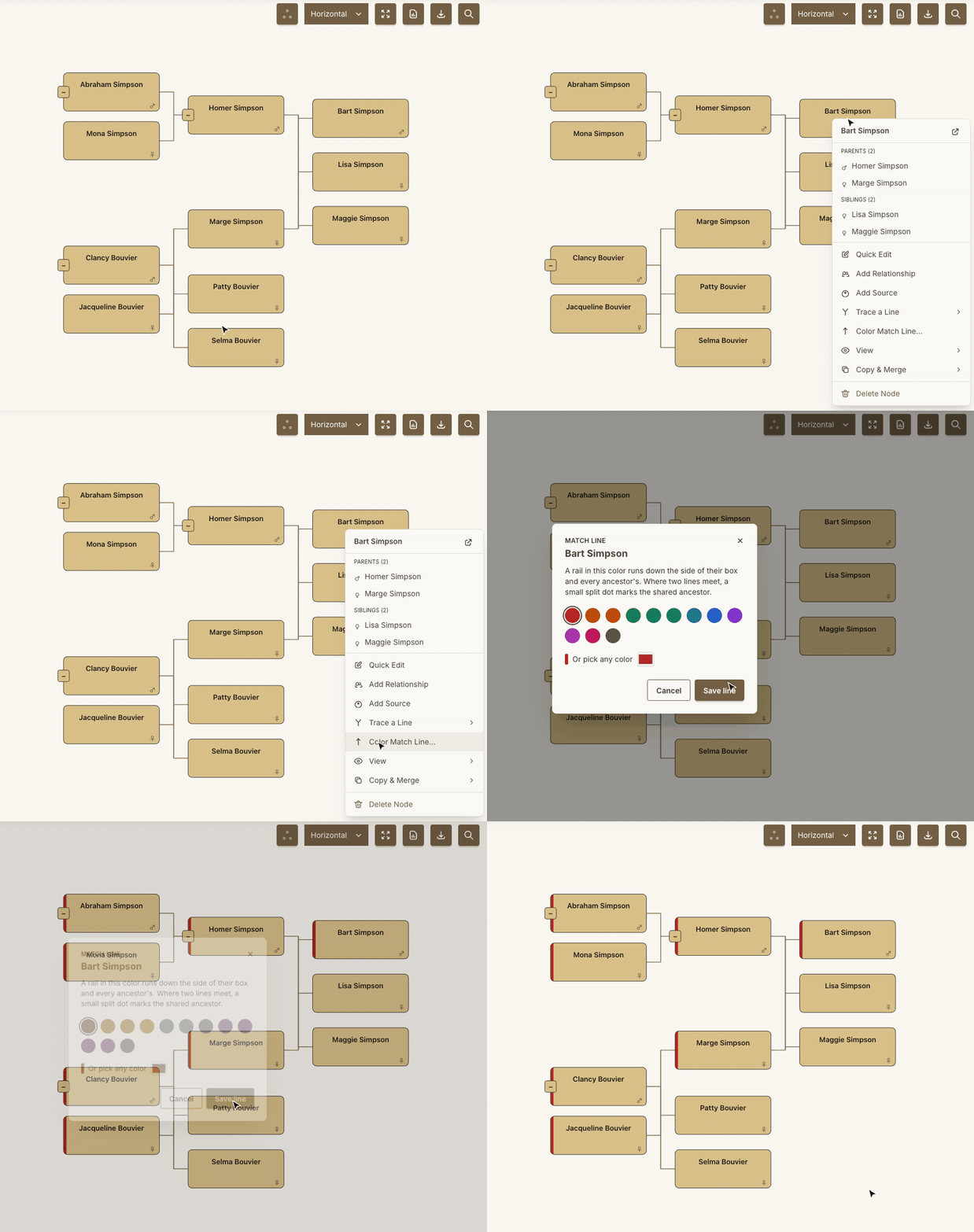
Color Match Lines and Trace a Line
Click anyone in the tree and choose Color Match Line to draw a DNA match's line up through their ancestors in a color of your choosing. Where two matches' lines meet, a split dot marks the shared ancestor. Trace a Line holds the direct line, mother's and father's sides, down to the anchor, and the X-DNA, Y-DNA and mtDNA paths in one menu. The same colors carry onto the Project Map.
Free on every plan. Watch the one-minute walkthrough
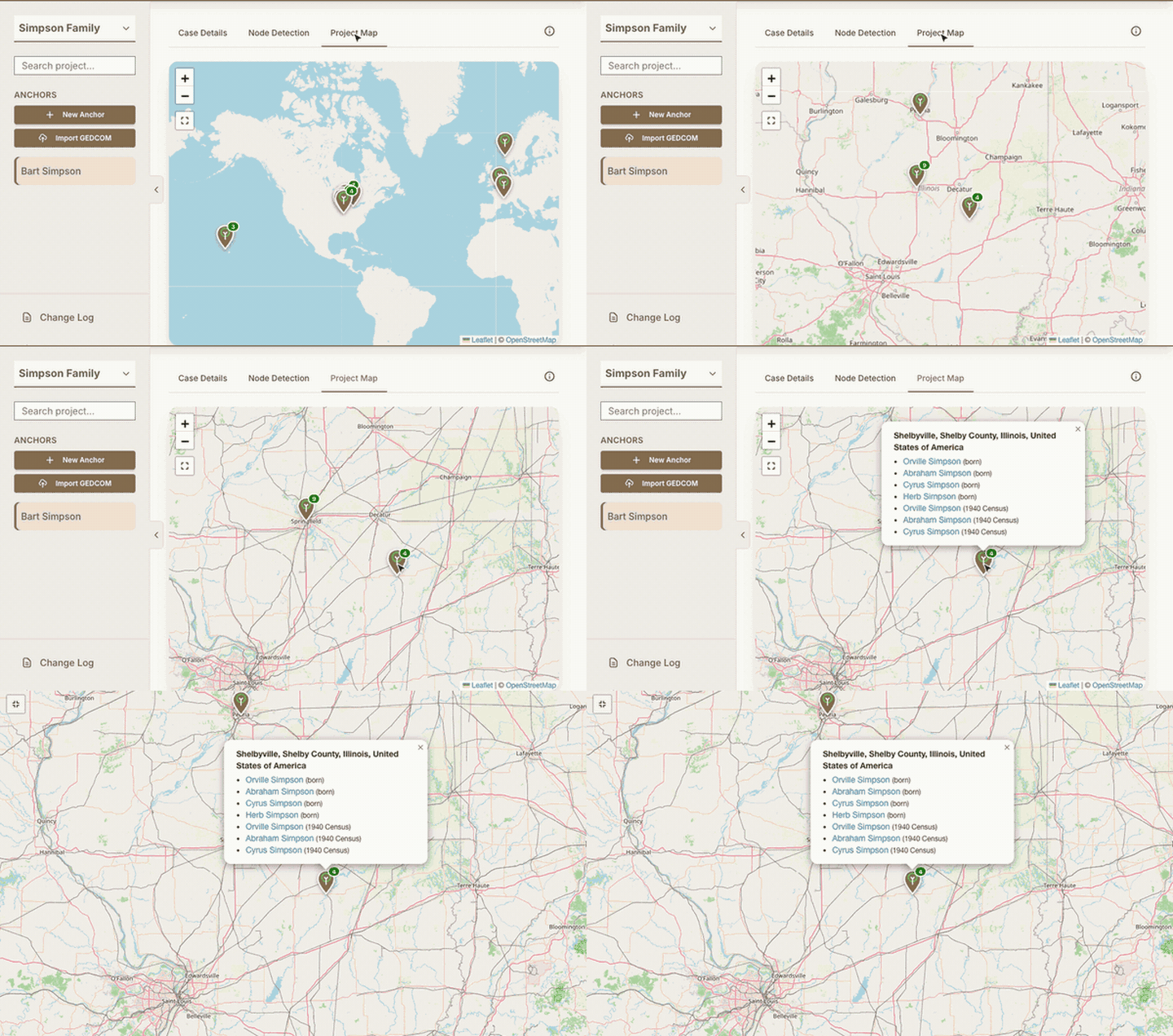
Sources and match lines on the Project Map
Give a source a location, like the town a census found a family in, and everyone tagged on it appears on that pin beside the births and deaths there. Each pin takes the color of the DNA match lines of the people there, striped where several lines meet; click a match in the key to fade every pin that isn't on their line.
Places written the way old records write them still map: English, Scottish and Irish counties, Swedish län and parishes, colonial America, Prussia and more. A farm or village the map can't find is pinned at its county.
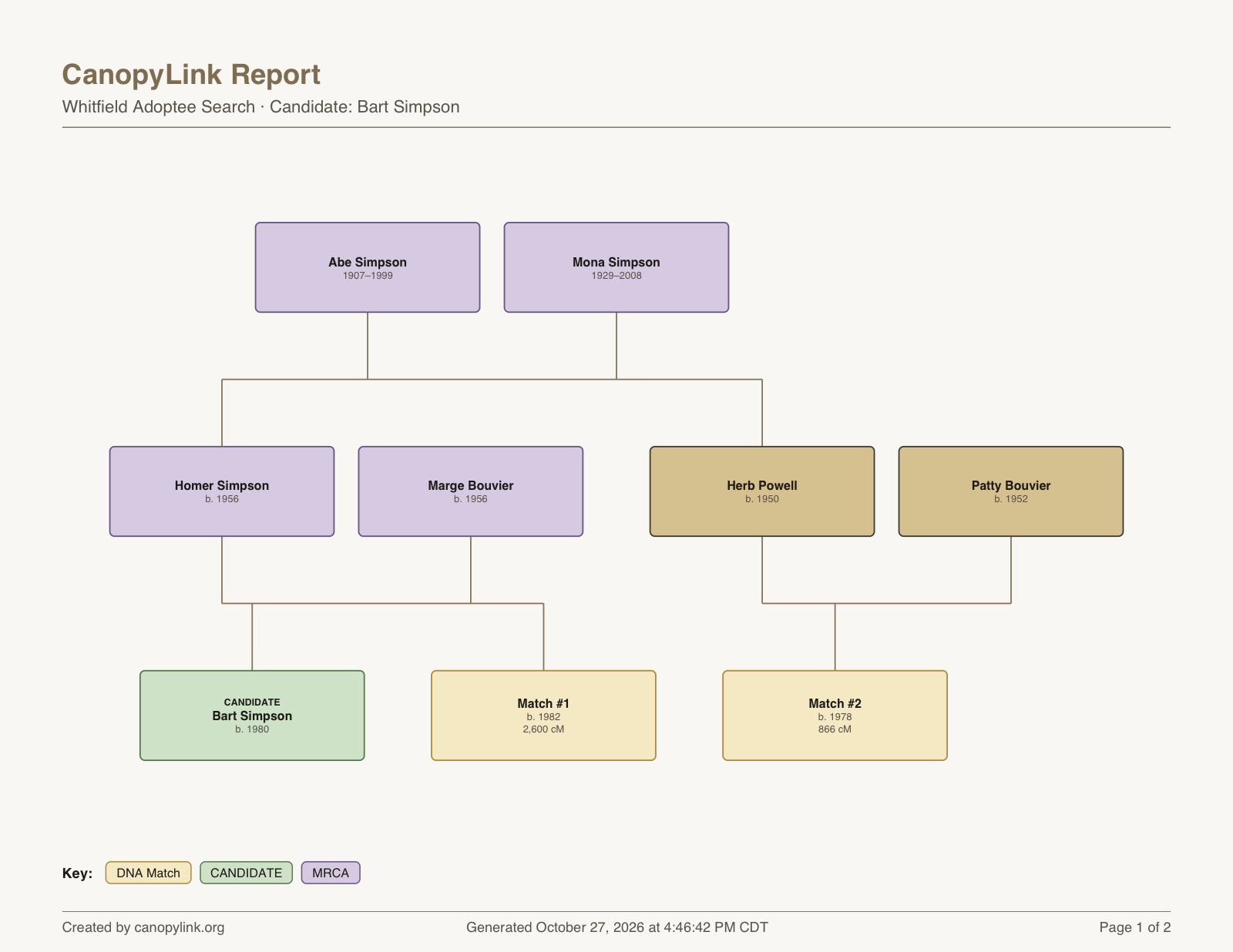
Reports drawn around your candidate
Pick a candidate when you make a report and the chart is built around them: the candidate in green, every DNA match in yellow as "Match #1", "Match #2" with their birth year and cM, and the most recent common ancestors in purple, with a key. Match names stay off the report, and big trees get a larger page so names stay readable.
Available on every paid plan. Compare plans
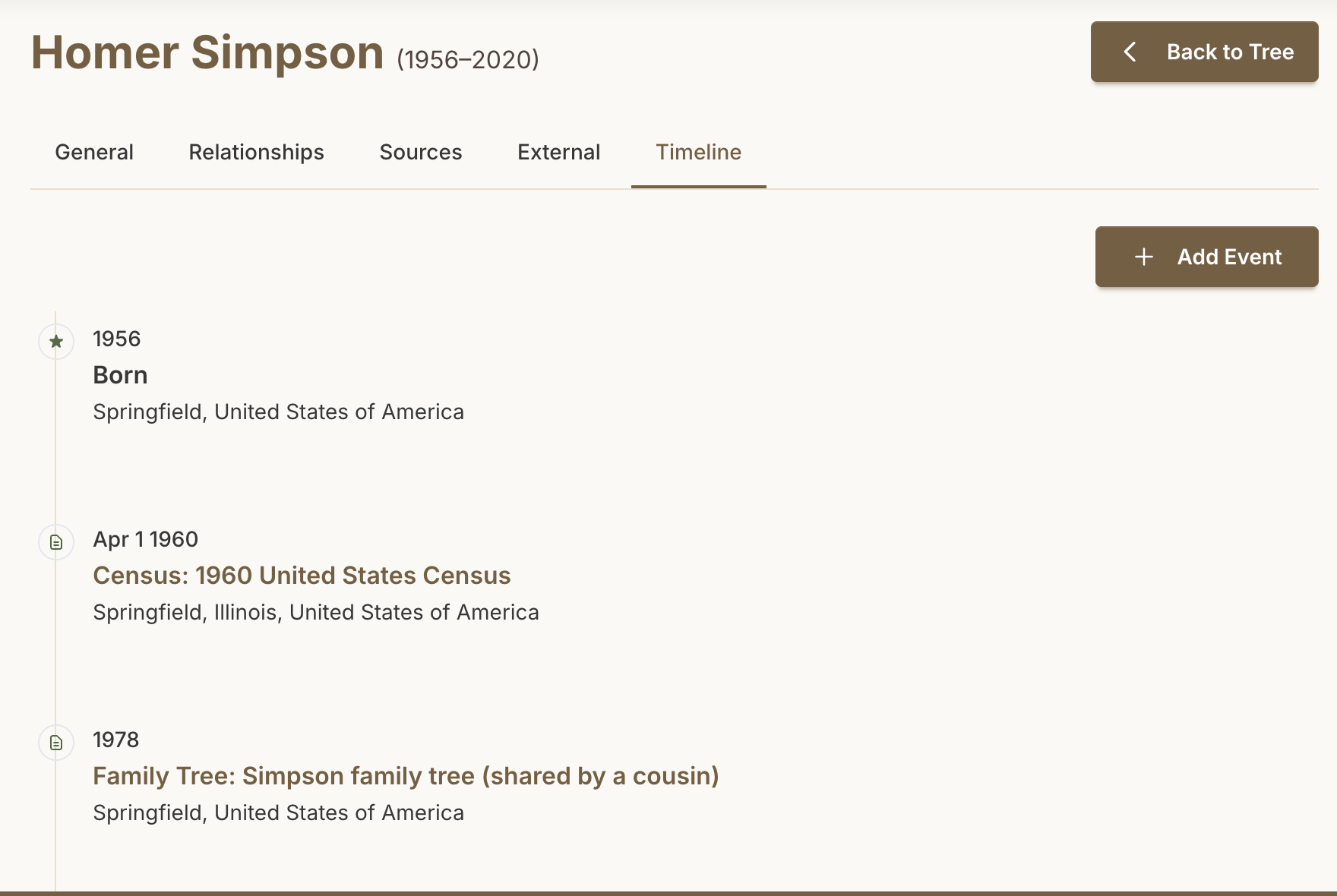
A timeline for every person
Every profile has a Timeline of births, marriages, divorces and deaths in order, with dates and places. Give a source a date, like the year of a census or the day a notice ran, and it takes its place on the timeline of everyone tagged on it. A Sources page lists every source across the project with a live search, so you can find that census record without opening profile after profile.
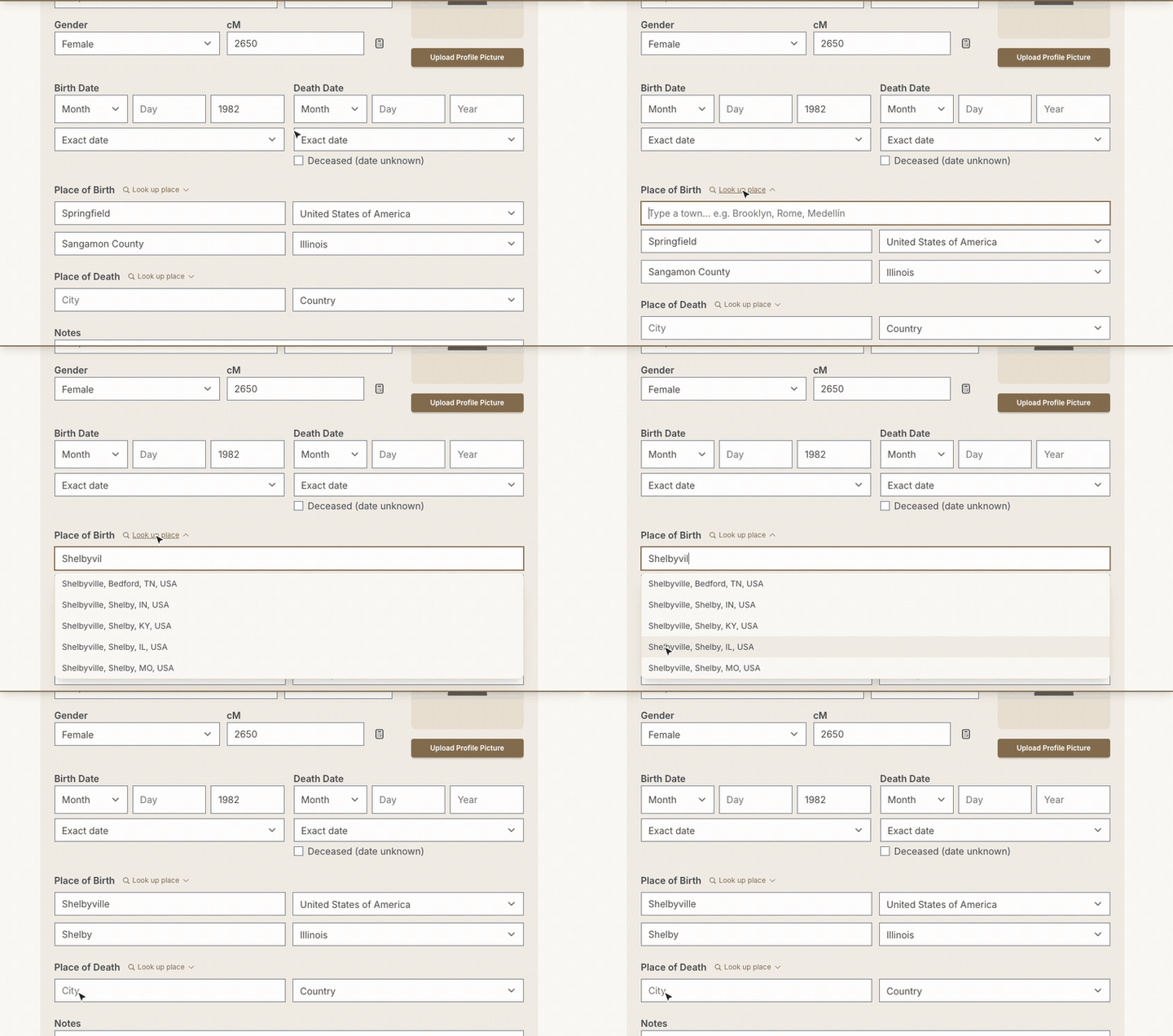
Look up places, then search by them
Start typing a town in any place field and pick it from the list; the county, state and country fill themselves in. The sidebar search then finds places as well as people: type a town, county or state to see everyone born, died or recorded there, and click a name to jump to them in the tree.
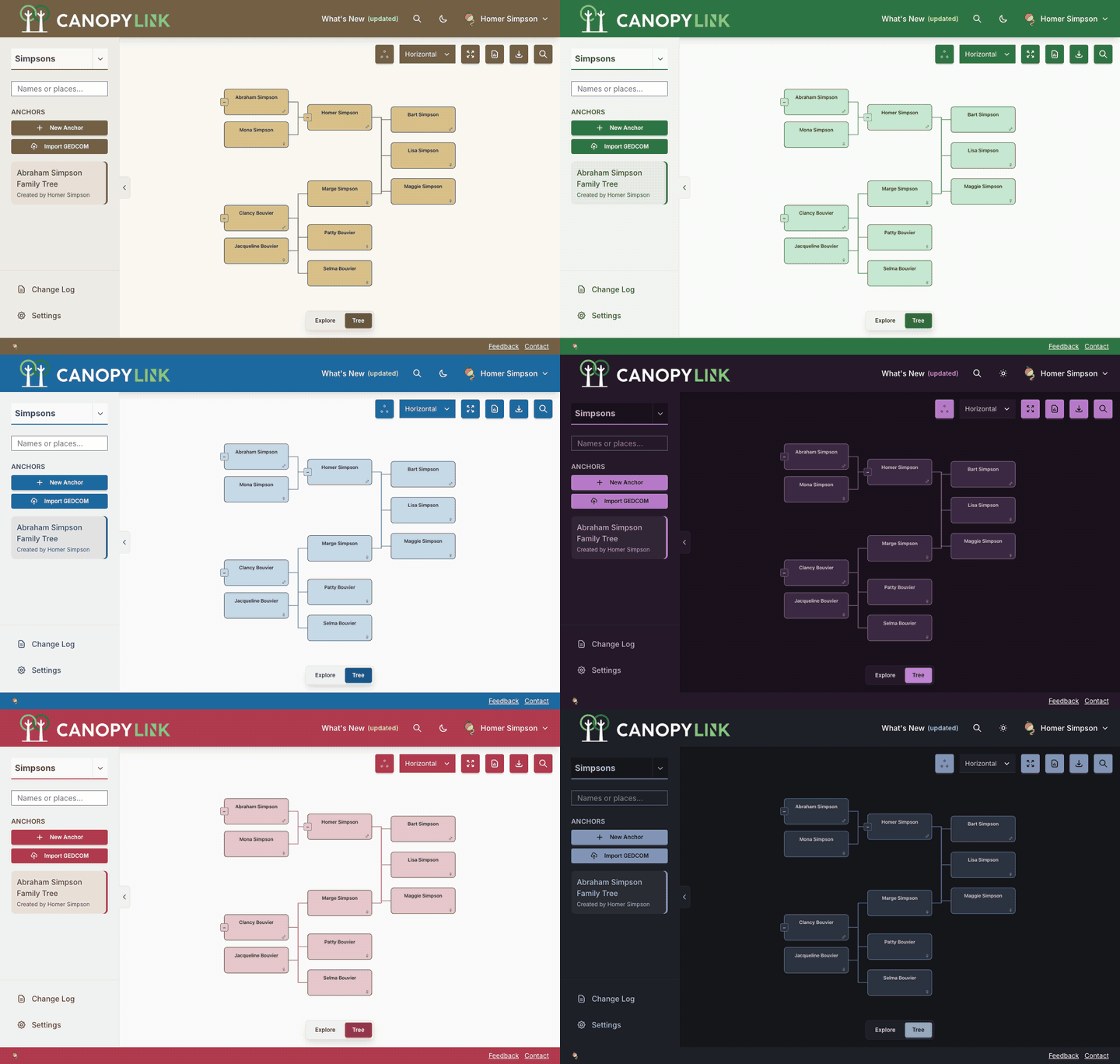
Six color themes, light and dark
Default, Ocean, Forest, Plum, Slate and Rosewood, each in light and dark. Your theme colors the tree as well as the app, is saved to your account so it follows you to every device, and every theme meets the WCAG AA standard for readable text.
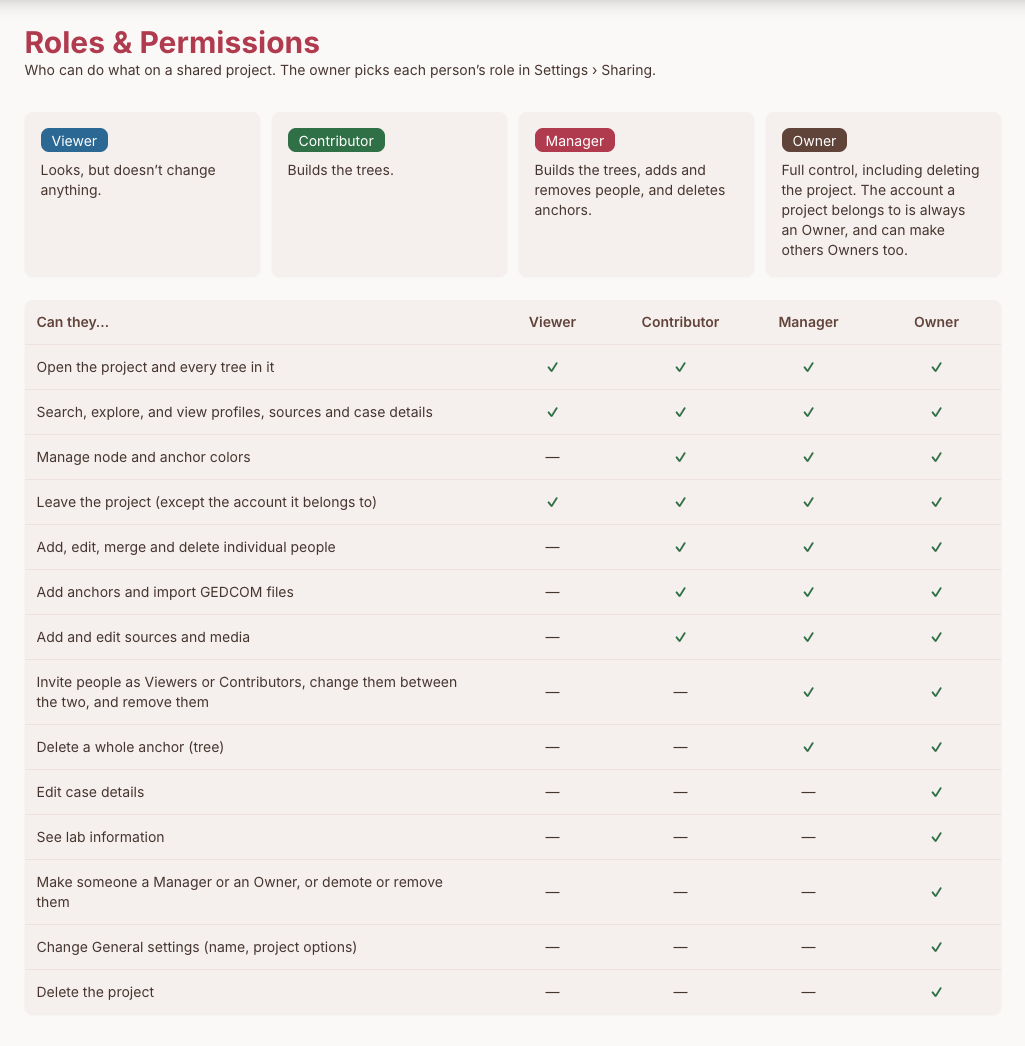
Viewer, Contributor, Manager and Owner
Share a project and give each person the access they need. Contributors build trees, Managers can also add and remove Viewers and Contributors and delete anchors, and Owners get full control, so staff never share one login. The Roles and Permissions page lists exactly what each role can do.
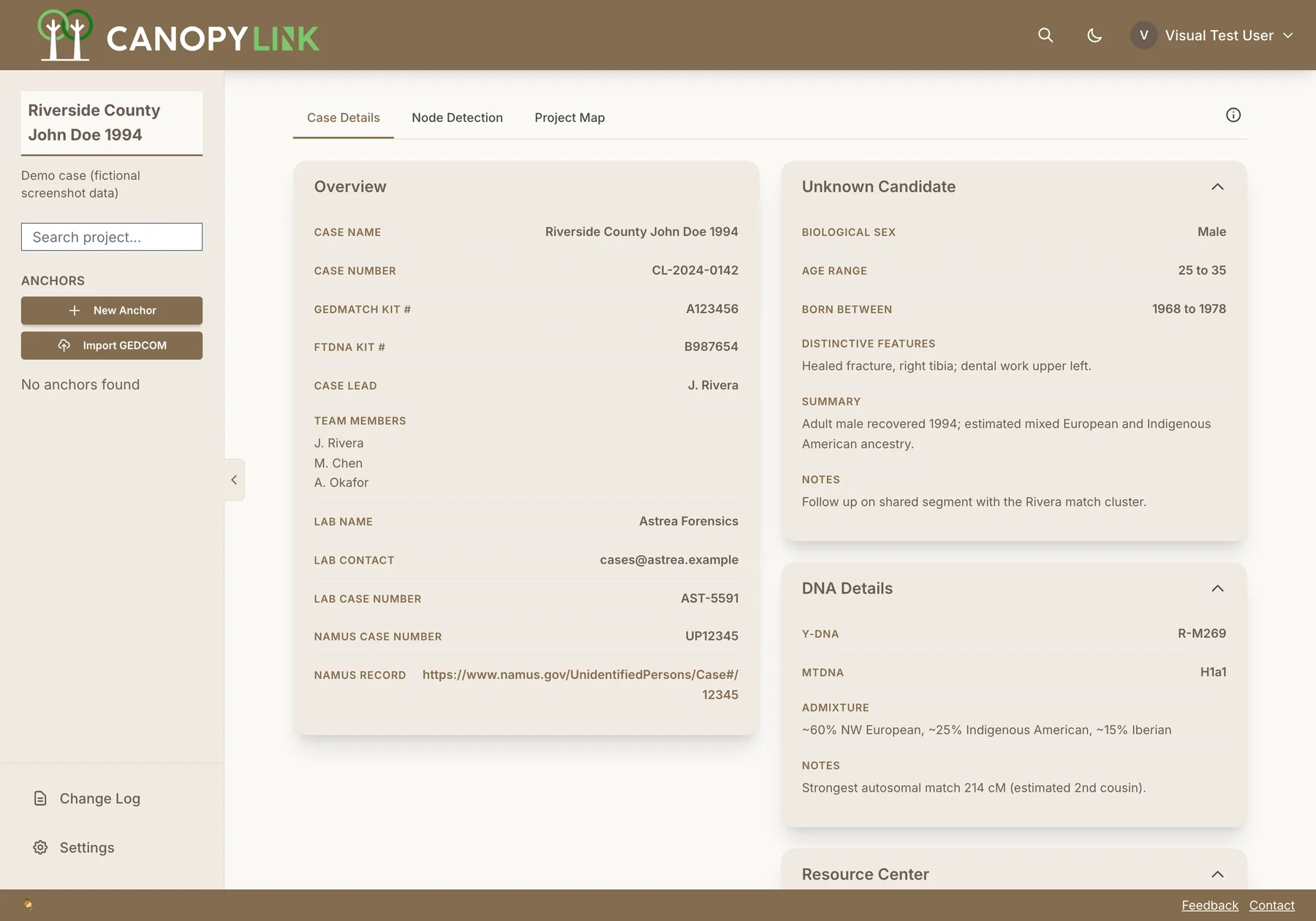
A structured case file for every project
Each project in CanopyLink is a case. Case Details keeps its facts in one place: case and kit numbers, the testing lab and NamUs record, the unknown candidate's profile, Y-DNA and mtDNA haplogroups, admixture, and a Resource Center of pinned links.
- Identifiers in one view: case number, GEDmatch and FTDNA kits, testing lab and NamUs record
- Candidate and DNA profile: biological sex, age range, Y-DNA and mtDNA haplogroups, admixture
- Read-only on the project home, editable in Settings, and encrypted at rest
- 1 Open Report
- 2 Pick people
- 3 Get your PDF
Tree Reports as Shareable PDFs
Switch on Report mode, click the people you want to include, and press Done. CanopyLink produces a vector PDF holding a tree diagram of just those individuals, preserving the layout you see on screen, followed by a detail list of each person's birth, death and sex, with estimated and approximate dates keeping their qualifiers.
- Each person's sources cited under their name, with a numbered Sources list at the end
- Hide a name and keep the box, to share a tree without naming everyone
- Select all or clear everyone in one click
Available on every paid plan. Compare plans
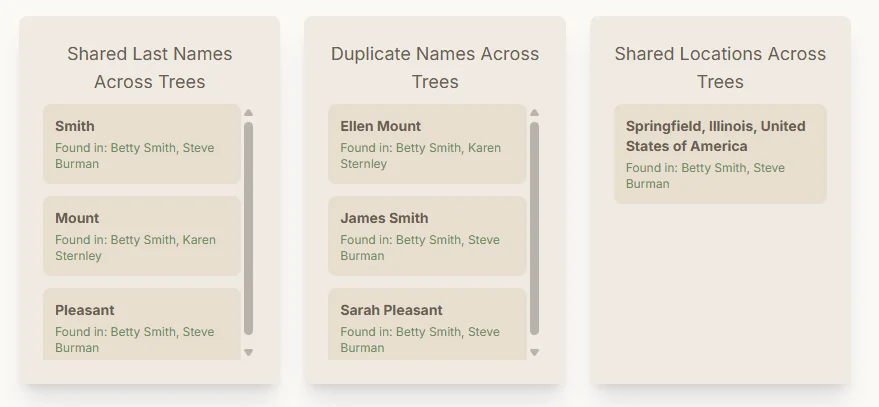
Easily Identify Common Ancestors
Quickly spot shared ancestors across multiple family lines. CanopyLink highlights common ancestors automatically, making it easy to trace connections and identify key individuals in complex family networks.
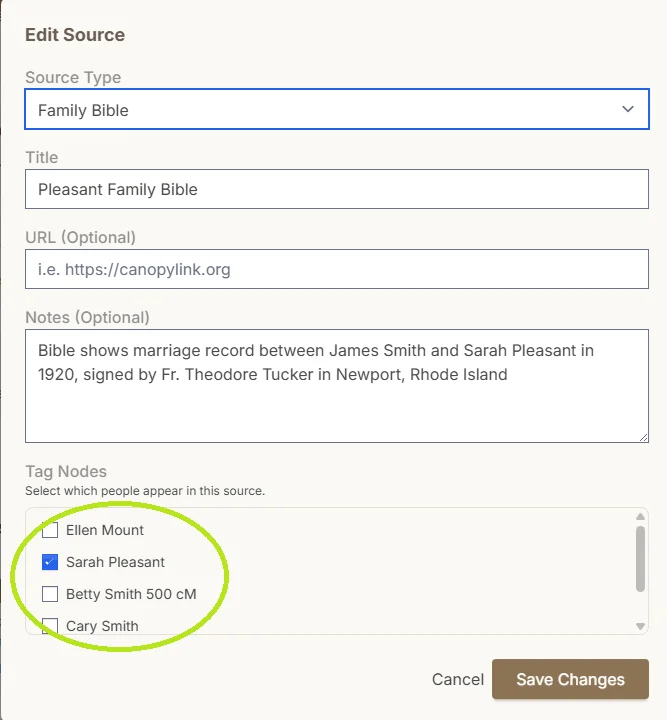
Document and Source Trees
Attach sources, documents, and notes directly to individuals in your tree. Keep your research organized and well-documented with a complete evidence trail for every connection.
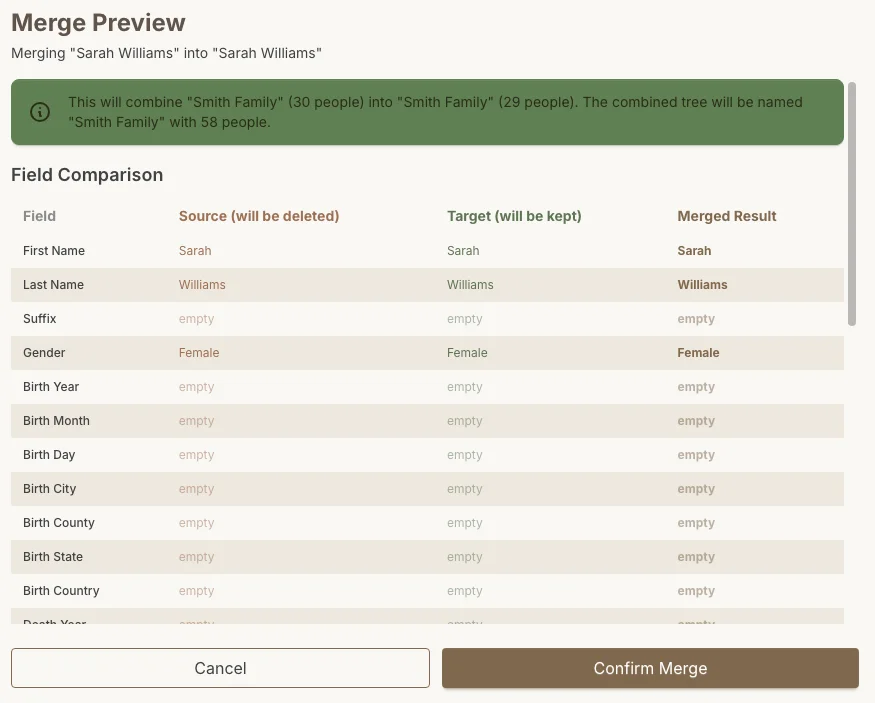
Merge Duplicate Individuals
Found the same person in multiple branches? CanopyLink lets you merge duplicate individuals with a side-by-side preview, combining their relationships and details into a single, accurate record. Keep your trees clean and connected.
And everything else
The rest of the toolkit: import, collaboration, analysis and account security. Items marked paid are included on every paid plan.
- GEDCOM ImportPaid
- Upload a GEDCOM, pick the starting person, and import direct lineage or the full tree, sources and notes included.
- GEDCOM Export
- Download any tree as a GEDCOM, or every tree in a project as a single ZIP on paid plans.
- Project Sharing
- Invite colleagues as Viewers, Contributors, Managers or Owners, and change or revoke access at any time.
- Project Changelog
- Every add, edit and delete recorded with who did it and when, filterable by tree.
- Project Locations Map
- Every birth, death and marriage place, and every source with a location, pinned on one map and colored by match line.
- Sources Index
- Every source across every tree in a project on one page, with a live search and a filter by type.
- Match List Import
- Upload a CSV from GEDmatch, MyHeritage, FTDNA or 23andMe and each match becomes an anchor with their shared cM and an assigned team member.
- Relationships Tab
- A couple's whole family on one profile tab, with Add Relationship right there, so nobody is duplicated or left out.
- Match Analysis
- Finds shared surnames, shared locations and likely same-person duplicates across your trees, including names that sound alike and double surnames. Dismiss the ones that aren't.
- Copy, Merge and Unmerge
- Copy a branch into another anchor or project you manage, merge duplicates with a preview, and unmerge a match back to an anchor of their own.
- Source Media UploadsPaid
- Attach and reorder scans, records and photographs on any source.
- DNA Inheritance Paths
- Highlight X-DNA, Y-DNA and mitochondrial inheritance lines through the tree.
- Shared cM Calculator
- Enter a centiMorgan value and see every plausible relationship with its range.
- Search Everything
- Find people and places in a project, or jump to any project or person from anywhere with the ⌘K command palette.
- Color Themes
- Six themes in light and dark, saved to your account, every one WCAG AA for readable text.
- Two-Factor Authentication
- TOTP two-factor sign-in with recovery codes, plus Google and Microsoft sign-in.
- Bulk Project Settings
- Apply a setting across every project you own at once, after seeing the current spread.
GEDCOM import, bulk GEDCOM export, source media uploads and Tree Reports are available on paid plans. See what each plan includes
Ready to start?
Sign up today and start building your family trees with CanopyLink.